
ESP32 CYD GPS-трекер: создание портативного дисплея местоположения с использованием LVGL
Want to turn your Дешевый желтый дисплей ESP32 (CYD) в portable GPS receiver that shows your exact location, altitude, speed, and precise time—all on a beautiful touchscreen interface? In this project, you’ll learn how to combine the popular NEO-6M GPS module with the CYD and LVGL graphics library to create a self-contained GPS data display perfect for hiking, sailing, car trips, or any outdoor activity where you need location awareness.
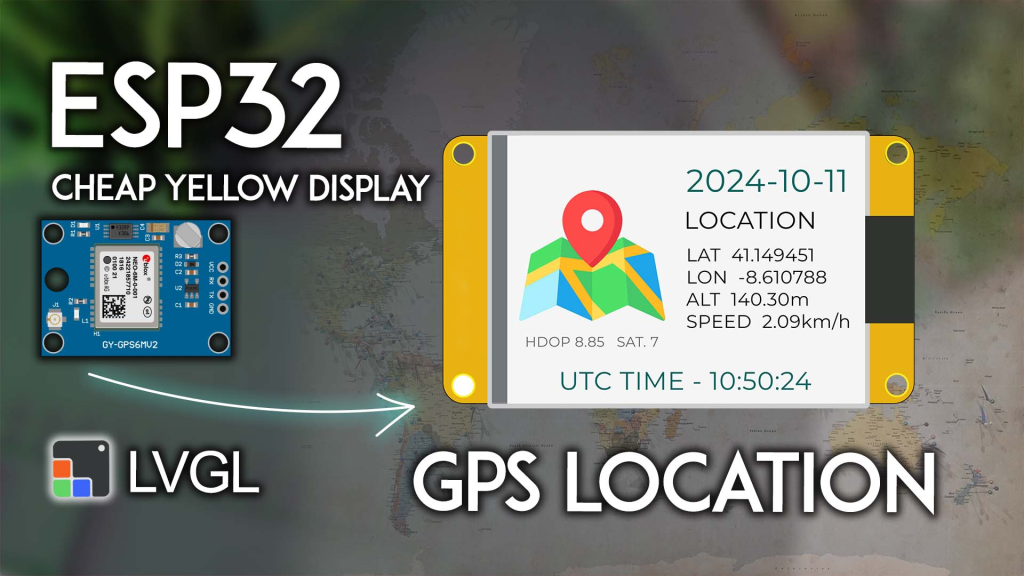
Project Overview: What You’ll Build
This project creates a real-time GPS information dashboard on your ESP32 CYD:
-
Location data: Latitude and longitude with 6-decimal precision
-
Altitude: Current height above sea level in meters
-
Speed: Travel speed in km/h
-
Time & Date: UTC time and current date from GPS satellites
-
Satellite info: Number of satellites in view and HDOP (horizontal dilution of precision)
-
Clean LVGL interface: All data displayed in a well-organized, easy-to-read layout with a custom map icon
The system updates automatically as the GPS module acquires new data, giving you a portable, battery-powered GPS display that costs a fraction of commercial devices.
What You’ll Need: Complete Parts List
| Компонент | Количество | Цель | Где купить |
|---|---|---|---|
| Дешевый желтый дисплей ESP32 (CYD) | 1 | Main board with touchscreen | Check price |
| NEO-6M GPS Module | 1 | GPS receiver with antenna | NEO-6M options |
| External GPS antenna | 1 | Included with most modules | – |
| Jumper wires | 4 | For connections | – |
| USB power bank (optional) | 1 | For portable operation | – |
👉 Find all components at the best prices here
Wiring the NEO-6M GPS Module to CYD
Connect the GPS module to the CYD‘'s CN1 connector (the extended GPIO header) as follows:
| NEO-6M GPS Module | ESP32 CYD CN1 | ESP32 GPIO |
|---|---|---|
| ВЦК | 3В3 | – |
| НД | НД | – |
| TX | GPIO 22 | Serial2 RX |
| РКС | GPIO 27 | Serial2 TX |
Important notes:
-
The GPS module requires a clear view of the sky for first fix—place the antenna near a window or outdoors
-
Some modules include a ceramic patch antenna; others use an external active antenna—both work
-
Он CYD‘s 3.3V output can power the GPS module (typical consumption ~45mA)
Prerequisites: Setting Up Your Environment
Complete these essential setup steps до uploading the code:
1. ESP32 Board Support
If not already done, install ESP32 boards in Arduino IDE: Installing ESP32 Board in Arduino IDE.
2. Get Familiar with the CYD
New to the Cheap Yellow Display? Complete our Getting Started with ESP32 CYD guide first. You’ll need to:
-
Install TFT_eSPI library
-
Configure the critical
User_Setup.hfile -
Test basic display functionality
3. Install LVGL for CYD
This project uses LVGL 9.x for the graphical interface. Follow our dedicated tutorial:
👉 LVGL with ESP32 Cheap Yellow Display
⚠️ CRITICAL: You must use the exact lv_conf.h file from that tutorial. Other configurations will нет work.
4. Install TinyGPSPlus Library
The TinyGPSPlus library parses NMEA sentences from the GPS module:
-
In Arduino IDE: Sketch > Добавить библиотеку > Управление библиотеками
-
Искать “TinyGPSPlus” by Mikal Hart
-
Install version 1.0.3 (recommended for compatibility)
5. (Optional) Understand NEO-6M GPS
If you’re new to GPS modules, let’s learn how GPS works and NMEA sentences.
Creating the Custom Image File
The LVGL interface includes a custom map icon. You need to create an extra file in your sketch folder.
Step 1: Download the Image Header File
⬇️ Download gps_image.h – This file contains the map icon converted to LVGL’s image format.
Step 2: Add to Your Sketch Folder
-
In Arduino IDE, save your main sketch (File > Save As…)
-
Place the downloaded
gps_image.hfile in the same folder as your.inofile -
After adding, your Arduino IDE should show two tabs: the main sketch and
gps_image.h
Want to learn more? See our guide: ESP32 CYD with LVGL: Display Image on the Screen
Complete Code: GPS Data Display on CYD
Copy the following code into your Arduino IDE. Make sure gps_image.h is in the same folder before compiling.
/*********
  ESP32 CYD with LVGL - GPS Location, Date, and Time Display
  Complete tutorial: https://RandomNerdTutorials.com/esp32-cyd-lvgl-gps-location/
*********/

#включать <lvgl.h>
#включать <TFT_eSPI.h>
#включать <TinyGPS++.h>
#включать "gps_image.h"  // Custom map icon

// --- GPS Serial Configuration ---
#определять RXD2 22          // GPS TX -> ESP32 RX (Serial2)
#определять TXD2 27          // GPS RX -> ESP32 TX (Serial2)
#определять GPS_BAUD 9600    // NEO-6M default baud rate

TinyGPSPlus gps;                 // GPS parser object
HardwareSerial gpsSerial(2);     // Use UART2 for GPS

// --- Display Dimensions ---
#определять ШИРИНА_ЭКРАНА 240
#определять ВЫСОТА_ЭКРАНА 320

// LVGL draw buffer
#определять DRAW_BUF_SIZE (ШИРИНА_ЭКРАНА * ВЫСОТА_ЭКРАНА / 10 * (LV_COLOR_DEPTH / 8))
uint32_t draw_buf[DRAW_BUF_SIZE / 4];

// --- GPS Data Variables (as Strings for display) ---
String current_date;
String utc_time;
String latitude;
String longitude;
String altitude;
String speed;
String hdop;
String satellites;

// --- LVGL Logging ---
пустота log_print(lv_log_level_t level, константа чар * buf) {
  LV_UNUSED(level);
  Серийный номер.println(buf);
  Серийный номер.flush();
}

// Helper to format time with leading zeros
Нить format_time(инт time_val) {
  возвращаться (time_val < 10) ? "0" + Нить(time_val) : Нить(time_val);
}

// --- LVGL UI Elements ---
static lv_obj_t * label_date;
static lv_obj_t * label_latitude;
static lv_obj_t * label_longitude;
static lv_obj_t * label_altitude;
static lv_obj_t * label_speed;
static lv_obj_t * label_utc_time;
static lv_obj_t * label_hdop_satellites;
static lv_obj_t * label_gps_data;

// --- Timer Callback: Updates all labels with latest GPS data ---
static пустота timer_cb(lv_timer_t * timer) {
  LV_UNUSED(timer);

  lv_label_set_text(label_date, current_date.c_str());
  lv_label_set_text(label_hdop_satellites,
                    Нить("HDOP " + hdop + "  SAT. " + satellites).c_str());

  // Main data block (latitude, longitude, altitude, speed)
  lv_label_set_text(label_gps_data,
                    Нить("LAT   " + latitude +
                           "\nLON   " + longitude +
                           "\nALT   " + altitude + "m" +
                           "\nSPEED   " + speed + "km/h").c_str());

  lv_label_set_text(label_utc_time, Нить("UTC TIME - " + utc_time).c_str());
}

// --- Create the LVGL User Interface ---
пустота create_gui() {
  // Declare the image from gps_image.h
  LV_IMAGE_DECLARE(image_gpsmap);

  // Map icon (left side)
  lv_obj_t * img_gpsmap = lv_image_create(lv_screen_active());
  lv_obj_align(img_gpsmap, LV_ALIGN_LEFT_MID, 10, -20);
  lv_image_set_src(img_gpsmap, &image_gpsmap);

  // HDOP and satellites info (bottom left)
  label_hdop_satellites = lv_label_create(lv_screen_active());
  lv_label_set_text(label_hdop_satellites, "HDOP --  SAT. --");
  lv_obj_align(label_hdop_satellites, LV_ALIGN_BOTTOM_LEFT, 30, -50);
  lv_obj_set_style_text_font(label_hdop_satellites, &lv_font_montserrat_12, 0);
  lv_obj_set_style_text_color(label_hdop_satellites, lv_palette_main(LV_PALETTE_GREY), 0);

  // Date (large, teal color, top center)
  label_date = lv_label_create(lv_screen_active());
  lv_label_set_text(label_date, "----/--/--");
  lv_obj_align(label_date, LV_ALIGN_CENTER, 60, -80);
  lv_obj_set_style_text_font(label_date, &lv_font_montserrat_26, 0);
  lv_obj_set_style_text_color(label_date, lv_palette_main(LV_PALETTE_TEAL), 0);

  // "LOCATION" heading
  lv_obj_t * heading_location = lv_label_create(lv_screen_active());
  lv_label_set_text(heading_location, "LOCATION");
  lv_obj_align(heading_location, LV_ALIGN_CENTER, 50, -40);
  lv_obj_set_style_text_font(heading_location, &lv_font_montserrat_20, 0);

  // Main GPS data block (lat, lon, alt, speed)
  label_gps_data = lv_label_create(lv_screen_active());
  lv_label_set_text(label_gps_data,
                    "LAT   --\nLON   --\nALT   --m\nSPEED   --km/h");
  lv_obj_align(label_gps_data, LV_ALIGN_CENTER, 60, 20);
  lv_obj_set_style_text_font(label_gps_data, &lv_font_montserrat_14, 0);

  // UTC time (teal, bottom center)
  label_utc_time = lv_label_create(lv_screen_active());
  lv_label_set_text(label_utc_time, "UTC TIME - --:--:--");
  lv_obj_align(label_utc_time, LV_ALIGN_BOTTOM_MID, 0, -10);
  lv_obj_set_style_text_font(label_utc_time, &lv_font_montserrat_20, 0);
  lv_obj_set_style_text_color(label_utc_time, lv_palette_main(LV_PALETTE_TEAL), 0);

  // Create timer to update UI (1ms, but effectively on each loop)
  lv_timer_t * timer = lv_timer_create(timer_cb, 1, NULL);
  lv_timer_ready(timer);
}

// --- Setup ---
пустота настраивать() {
  Серийный номер.начинать(115200);
  Серийный номер.println("ESP32 CYD GPS Tracker Starting...");

  // Initialize GPS Serial connection
  gpsSerial.начинать(GPS_BAUD, SERIAL_8N1, RXD2, TXD2);
  Серийный номер.println("GPS Serial initialized at 9600 baud");

  // Initialize LVGL
  lv_init();
  lv_log_register_print_cb(log_print);

  // Инициализация дисплея
  lv_display_t * disp = lv_tft_espi_create(ШИРИНА_ЭКРАНА, ВЫСОТА_ЭКРАНА,
                                            draw_buf, sizeof(draw_buf));
  lv_display_set_rotation(disp, LV_DISPLAY_ROTATION_270);

  // Create the GUI
  create_gui();

  Серийный номер.println("Ready. Waiting for GPS fix...");
}

// --- Main Loop ---
пустота петля() {
  lv_task_handler();  // Let LVGL handle GUI tasks
  lv_tick_inc(5);     // Tell LVGL time passed
  задерживать(5);           // Small delay

  // Read and parse GPS data continuously
  пока (gpsSerial.доступный() > 0) {
    gps.encode(gpsSerial.читать());
  }

  // Check if location data is updated (typically every 1 second)
  если (gps.расположение.isUpdated()) {
    // Update all data strings
    latitude = Нить(gps.расположение.lat(), 6);
    longitude = Нить(gps.расположение.lng(), 6);
    speed = Нить(gps.speed.kmph(), 2);
    altitude = Нить(gps.altitude.meters(), 2);
    hdop = Нить(gps.hdop.value() / 100.0, 2);
    satellites = Нить(gps.satellites.value());

    // Format date: YYYY-MM-DD
    current_date = Нить(gps.date.year()) + "-" +
                   format_time(gps.date.month()) + "-" +
                   format_time(gps.date.day());

    // Format UTC time: HH:MM:SS
    utc_time = format_time(gps.time.hour()) + ":" +
               format_time(gps.time.minute()) + ":" +
               format_time(gps.time.second());

    // Print to Serial Monitor for debugging
    Серийный номер.println("--- GPS Update ---");
    Серийный номер.печать("LAT: "); Серийный номер.println(latitude);
    Серийный номер.печать("LON: "); Серийный номер.println(longitude);
    Серийный номер.печать("Speed: "); Серийный номер.печать(speed); Серийный номер.println(" km/h");
    Серийный номер.печать("Altitude: "); Серийный номер.печать(altitude); Серийный номер.println(" m");
    Серийный номер.печать("HDOP: "); Серийный номер.println(hdop);
    Серийный номер.печать("Satellites: "); Серийный номер.println(satellites);
    Серийный номер.печать("Date: "); Серийный номер.println(current_date);
    Серийный номер.печать("UTC Time: "); Серийный номер.println(utc_time);
    Серийный номер.println("-----------------");
  }
}
How the Code Works
GPS Data Parsing with TinyGPSPlus
Он TinyGPSPlus library handles all the complex NMEA sentence parsing. In the main loop, we continuously feed it characters from the GPS module:
пока (gpsSerial.доступный() > 0) {
  gps.encode(gpsSerial.читать());
}
When the library successfully decodes a location update (gps.location.isUpdated()), we extract all the relevant fields and update our display strings.
LVGL Interface Design
The GUI is built with LVGL’s object-oriented approach:
-
Map icon: Loaded from the custom
gps_image.hfile -
Date: Large teal text showing current date
-
Main data block: Multi-line label showing LAT, LON, ALT, SPEED
-
HDOP/Satellites: Small grey text at bottom left
-
UTC Time: Teal text at bottom center
A timer callback (timer_cb) updates all labels with the latest string values every millisecond, ensuring the display stays current.
String Formatting
Он format_time() helper ensures time values (hours, minutes, seconds) always display with two digits (e.g., “09” instead of “9”).
Testing Your GPS Display
First Fix (Important!)
GPS modules need time to get a fix, especially indoors:
-
Place the GPS antenna near a window with clear sky view
-
Power the system and wait—first fix can take 30 seconds to 5 minutes
-
Once locked, the display will populate with data
Serial Monitor Output
Open Serial Monitor (115200 baud) to see detailed GPS data as it arrives:
--- GPS Update ---
LAT: 41.387900
LON: 2.169920
Speed: 0.12 km/h
Altitude: 24.50 m
HDOP: 1.20
Satellites: 8
Date: 2024-11-12
UTC Time: 15:23:45
-----------------
Troubleshooting
| Проблема | Likely Solution |
|---|---|
| No GPS data | Check wiring (TX↔RX crossover), verify baud rate (9600) |
| “—” on display | GPS hasn’t gotten a fix yet—be patient and ensure clear sky view |
| Garbled Serial output | Check baud rate settings (115200 for debug, 9600 for GPS) |
| Image not displaying | Проверять gps_image.h is in the same folder as the .ino file |
| Compilation errors | Ensure LVGL and TFT_eSPI are configured correctly (see prerequisites) |
Taking It Further: Project Enhancements
This foundation opens many possibilities for portable GPS applications:
1. Add Data Logging to SD Card
Он CYD has a microSD slot. Log all GPS positions with timestamps for trip tracking.
2. Create a Waypoint Navigator
Add buttons to save current location as a waypoint, then show distance and bearing to that point.
3. Add Compass Display
Integrate a magnetometer (like HMC5883L) to show heading along with GPS data.
4. Make It Battery Powered
Power the CYD and GPS from a USB power bank for true portability.
5. Add Map Display
Use LVGL’s canvas to draw a simple track map based on accumulated GPS points.
Where to Buy Components
Ready to build your own GPS tracker?
-
ESP32 Cheap Yellow Display (CYD) – Main display unit
-
NEO-6M GPS Module – With antenna included
👉 Check all components and best prices here
Заключение
You’ve just built a fully functional GPS data display using the Дешевый желтый дисплей ESP32 and LVGL. This project demonstrates:
-
GPS integration with the popular NEO-6M module
-
Real-time data parsing using TinyGPSPlus
-
Professional LVGL interface with custom images
-
Portable operation potential for outdoor use
Whether you’re hiking, sailing, or just curious about GPS technology, this device gives you a window into the satellite positioning system that powers modern navigation.
Get your components today and start tracking your position!
======================================