
Полное руководство по ESP32 MPU-6050: освоение распознавания движений с помощью Arduino IDE
Unlocking Motion Intelligence: A Practical Guide to ESP32 and MPU-6050 Integration
The MPU-6050 is not just another sensor; it’s a gateway to understanding motion in the digital world. By combining a 3-axis accelerometer and a 3-axis gyroscope on a single chip, this versatile Inertial Measurement Unit (IMU) enables projects ranging from simple orientation detection to complex motion tracking systems. While the original tutorial provides essential connection basics, this comprehensive guide dives deeper—drawing from extensive real-world implementation experience—to transform theoretical concepts into reliable, production-ready applications.
Over countless projects involving robotics, drone stabilization, and gesture control systems, I’ve identified the critical nuances that separate functional prototypes from robust implementations. The ESP32, with its dual-core processing power and ample I/O, is perfectly suited to handle the continuous data stream from the MPU-6050, especially when implementing sensor fusion algorithms that demand real-time computation. This guide will not only show you how to connect the hardware but will equip you with professional techniques for calibration, filtering, and error compensation that most tutorials overlook.
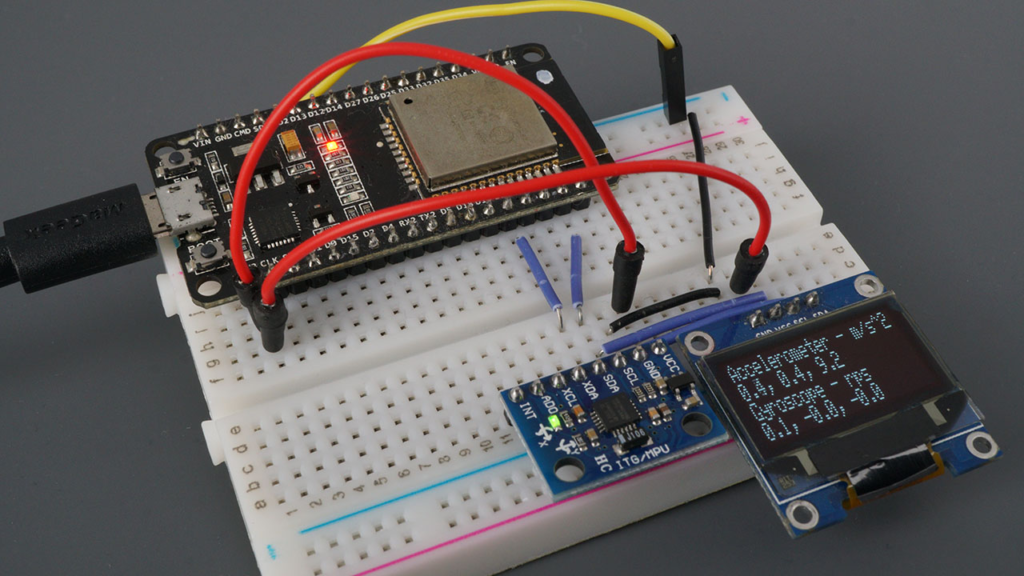
Understanding the MPU-6050: Beyond the Datasheet
Sensor Architecture and Practical Implications
The MPU-6050’s integrated design offers significant advantages, but understanding its internal workings reveals important implementation considerations:
Accelerometer Operation:
-
Measurement Principle: Uses microscopic capacitive plates that move under acceleration, changing capacitance proportionally to force applied
-
Practical Range Selection: While the sensor supports ±2g to ±16g ranges, most projects optimally use ±4g or ±8g for general motion sensing
-
Noise Characteristics: Typically exhibits 400µg/√Hz noise density, requiring filtering for precise measurements
Gyroscope Characteristics:
-
Vibration Sensitivity: MEMS gyroscopes measure Coriolis force on vibrating structures, making them sensitive to external vibration
-
Temperature Dependence: Zero-rate output can drift up to 0.1°/s/°C without compensation
-
Startup Time: Requires 30-50ms stabilization after power-on for reliable readings
Integrated Temperature Sensor:
-
Primarily intended for internal compensation rather than ambient measurement
-
Accuracy of ±1°C suffices for sensor calibration purposes
-
Response time of approximately 4 seconds to temperature changes
Pinout Deep Dive: Advanced Configuration Options
While the basic pin connections are straightforward, several pins offer advanced functionality:
AD0 Address Pin:
// Professional I2C address management for multiple MPU-6050 units
class MPU6050_Array {
private:
    инт addressPins[4] = {15, 16, 17, 18}; // GPIOs controlling AD0
    инт sensorCount = 0;

public:
    пустота initializeArray() {
        // Configure multiple sensors on same I2C bus
        для(инт i = 0; i < 4; i++) {
            pinMode(addressPins[i], ВЫХОД);
            digitalWrite(addressPins[i], НИЗКИЙ); // Default address 0x68

            // Test each potential sensor
            Wire.beginTransmission(0x68 + i);
            если(Wire.endTransmission() == 0) {
                sensorCount++;
                Серийный номер.printf("Found MPU-6050 at address 0x%X\n", 0x68 + i);
            }
        }
    }

    инт getSensorCount() { возвращаться sensorCount; }
};
Interrupt Pin (INT) Applications:
-
Data Ready Interrupt: Eliminates polling and reduces processor load
-
Motion Detection: Configurable threshold-based wake-from-sleep triggering
-
Zero Motion Detection: Energy-saving feature for battery-operated devices
Auxiliary I2C Bus (XDA, XCL):
-
Enables daisy-chaining of additional I2C sensors
-
Maintains synchronized sampling between multiple sensors
-
Offloads data collection from main processor
Professional Installation and Configuration
Library Selection: Beyond the Basics
While the Adafruit library offers excellent simplicity, professional applications often benefit from alternative approaches:
Library Comparison Table:
| Библиотека | Лучше всего подходит для | Основные характеристики | Performance Consideration |
|---|---|---|---|
| Adafruit MPU6050 | Quick prototyping, learning | Simple API, good documentation, OLED examples | Higher-level abstraction, some latency |
| Jeff Rowberg’s MPU6050 | Advanced applications, research | Raw register access, DMP support, calibration tools | Steeper learning curve, maximum flexibility |
| PlatformIO Built-in | Cross-platform development | Integrated dependency management | Consistent across platforms |
Professional Library Setup:
// PlatformIO platformio.ini configuration for production projects
[env:esp32dev]
платформа = espressif32
board = esp32dev
framework = arduino

lib_deps =
    adafruit/Adafruit MPU6050 @ ^2.1.0
    adafruit/Adafruit Unified Sensor @ ^1.1.7
    adafruit/Adafruit BusIO @ ^1.14.1
    adafruit/Adafruit SSD1306 @ ^2.5.7

monitor_speed = 115200
build_flags =
    -D MPU6050_CALIBRATION_ENABLED
    -D ENABLE_SENSOR_FUSION
Optimal ESP32 GPIO Selection
While GPIO 21 (SDA) and 22 (SCL) are default I2C pins, the ESP32 offers flexibility with important considerations:
Recommended I2C Pin Alternatives:
-
Primary: GPIO 21 (SDA), GPIO 22 (SCL) – Default, minimal configuration
-
Secondary: GPIO 15 (SDA), GPIO 13 (SCL) – Avoid conflicts with flash memory
-
Tertiary: GPIO 18 (SDA), GPIO 19 (SCL) – Good for breadboard layouts
Professional Wiring Considerations:
// I2C bus diagnostics and optimization
пустота diagnoseI2CBus(инт sdaPin, инт sclPin) {
    Wire.начинать(sdaPin, sclPin);
    Wire.setClock(400000); // Fast-mode 400kHz

    Серийный номер.println("\n=== I2C BUS DIAGNOSTICS ===");

    // Scan for devices
    byte error, address;
    инт devicesFound = 0;

    для(address = 1; address < 127; address++) {
        Wire.beginTransmission(address);
        error = Wire.endTransmission();

        если(error == 0) {
            Серийный номер.printf("Device found at address 0x%02X\n", address);
            devicesFound++;
        }
    }

    Серийный номер.printf("Total devices found: %d\n", devicesFound);

    // Test communication speed
    без подписи длинный startTime = micros();
    для(инт i = 0; i < 100; i++) {
        Wire.beginTransmission(0x68); // MPU-6050 address
        Wire.писать(0x3B); // ACCEL_XOUT_H register
        Wire.endTransmission(ЛОЖЬ);
        Wire.requestFrom(0x68, 14);
        пока(Wire.доступный()) Wire.читать();
    }
    без подписи длинный endTime = micros();

    плавать transferTime = (endTime - startTime) / 100.0;
    Серийный номер.printf("Average read time: %.2f µs\n", transferTime);

    если(transferTime > 1000) {
        Серийный номер.println("Warning: I2C communication slower than expected");
        Серийный номер.println("Check pull-up resistors (4.7kΩ recommended)");
    }
}
Advanced Sensor Configuration for Real Applications
Configuring Measurement Ranges Intelligently
The default ±8g accelerometer and ±500°/s gyroscope ranges work for general purposes, but optimal configuration depends on your specific application:
Application-Specific Configuration Guide:
| Тип проекта | Accelerometer Range | Gyroscope Range | Filter Bandwidth | Rationale |
|---|---|---|---|---|
| Gesture Recognition | ±4g | ±250°/s | 21-44 Hz | Maximizes resolution for subtle motions |
| Drone Flight Controller | ±8g | ±1000°/s | 94-184 Hz | Captures rapid maneuvers, reduces latency |
| Step Counter/Pedometer | ±2g | ±250°/s | 5-10 Hz | Focuses on low-frequency human motion |
| Vehicle Telemetry | ±16g | ±2000°/s | 260 Hz | Handles high-G events, minimal filtering |
| Robotic Arm Control | ±8g | ±500°/s | 21-44 Hz | Balances precision and responsiveness |
Dynamic Range Adjustment Code:
class AdaptiveMPU6050 {
private:
    Adafruit_MPU6050 mpu;
    плавать currentMaxAccel = 0;
    плавать currentMaxGyro = 0;
    без подписи длинный lastRangeCheck = 0;
    константа без подписи длинный rangeCheckInterval = 1000; // Check every second

public:
    пустота initialize() {
        если(!mpu.начинать()) {
            Серийный номер.println("MPU6050 initialization failed!");
            пока(1);
        }

        // Start with conservative ranges
        mpu.setAccelerometerRange(MPU6050_RANGE_4_G);
        mpu.setGyroRange(MPU6050_RANGE_250_DEG);
        mpu.setFilterBandwidth(MPU6050_BAND_21_HZ);
    }

    пустота обновлять() {
        sensors_event_t a, g, temp;
        mpu.getEvent(&a, &g, &temp);

        // Track maximum values for adaptive configuration
        trackPeaks(a, g);

        // Periodically adjust ranges if needed
        если(миллис() - lastRangeCheck > rangeCheckInterval) {
            adjustRanges();
            lastRangeCheck = миллис();
        }
    }

private:
    пустота trackPeaks(sensors_event_t& a, sensors_event_t& g) {
        // Calculate vector magnitudes
        плавать accelMag = sqrt(a.acceleration.x * a.acceleration.x +
                               a.acceleration.y * a.acceleration.y +
                               a.acceleration.z * a.acceleration.z);

        плавать gyroMag = sqrt(g.gyro.x * g.gyro.x +
                             g.gyro.y * g.gyro.y +
                             g.gyro.z * g.gyro.z);

        // Update peaks with decay
        currentMaxAccel = макс(currentMaxAccel * 0.95, accelMag);
        currentMaxGyro = макс(currentMaxGyro * 0.95, gyroMag * 180/PI); // Convert to °/s
    }

    пустота adjustRanges() {
        // Adjust accelerometer range
        если(currentMaxAccel > 14) {
            mpu.setAccelerometerRange(MPU6050_RANGE_16_G);
            Серийный номер.println("Accelerometer range increased to ±16g");
        } еще если(currentMaxAccel > 6 && currentMaxAccel <= 14) {
            mpu.setAccelerometerRange(MPU6050_RANGE_8_G);
        } еще если(currentMaxAccel <= 6) {
            mpu.setAccelerometerRange(MPU6050_RANGE_4_G);
        }

        // Adjust gyroscope range (convert to °/s for comparison)
        если(currentMaxGyro > 1500) {
            mpu.setGyroRange(MPU6050_RANGE_2000_DEG);
            Серийный номер.println("Gyroscope range increased to ±2000°/s");
        } еще если(currentMaxGyro > 750 && currentMaxGyro <= 1500) {
            mpu.setGyroRange(MPU6050_RANGE_1000_DEG);
        } еще если(currentMaxGyro <= 750) {
            mpu.setGyroRange(MPU6050_RANGE_500_DEG);
        }

        // Reset tracking
        currentMaxAccel = 0;
        currentMaxGyro = 0;
    }
};
Filter Bandwidth: The Critical Performance Trade-off
The MPU-6050’s configurable Digital Low-Pass Filter (DLPF) significantly impacts performance:
Bandwidth Selection Guidelines:
-
5-10 Hz: Excellent noise reduction, suitable for slow movements (<1Hz)
-
21-44 Hz: General purpose, balances noise and responsiveness
-
94-184 Hz: High dynamic applications, minimal latency
-
260 Hz: Maximum bandwidth, useful for impact detection
Filter Performance Analysis:
пустота analyzeFilterPerformance() {
    Серийный номер.println("\n=== FILTER PERFORMANCE ANALYSIS ===");

    // Test each filter setting
    инт bandwidths[] = {5, 10, 21, 44, 94, 184, 260};
    константа чар* bandwidthNames[] = {"5 Hz", "10 Hz", "21 Hz", "44 Hz",
                                    "94 Hz", "184 Hz", "260 Hz"};

    для(инт i = 0; i < 7; i++) {
        // Configure filter
        switch(bandwidths[i]) {
            case 5: mpu.setFilterBandwidth(MPU6050_BAND_5_HZ); перерыв;
            case 10: mpu.setFilterBandwidth(MPU6050_BAND_10_HZ); перерыв;
            case 21: mpu.setFilterBandwidth(MPU6050_BAND_21_HZ); перерыв;
            case 44: mpu.setFilterBandwidth(MPU6050_BAND_44_HZ); перерыв;
            case 94: mpu.setFilterBandwidth(MPU6050_BAND_94_HZ); перерыв;
            case 184: mpu.setFilterBandwidth(MPU6050_BAND_184_HZ); перерыв;
            case 260: mpu.setFilterBandwidth(MPU6050_BAND_260_HZ); перерыв;
        }

        задерживать(100); // Allow filter to settle

        // Collect samples for analysis
        плавать noiseLevel = 0;
        константа инт samples = 100;

        для(инт j = 0; j < samples; j++) {
            sensors_event_t a, g, temp;
            mpu.getEvent(&a, &g, &temp);

            // Calculate noise (deviation from running average)
            static плавать avgAccelZ = 9.81;
            avgAccelZ = avgAccelZ * 0.99 + a.acceleration.z * 0.01;
            noiseLevel += abs(a.acceleration.z - avgAccelZ);

            задерживать(10);
        }

        noiseLevel /= samples;

        Серийный номер.printf("%-6s: Noise ≈ %.3f m/s², Latency ≈ %.1f ms\n",
                      bandwidthNames[i], noiseLevel, 1000.0/(bandwidths[i]*2));
    }
}
Professional Calibration Techniques
Comprehensive Six-Position Calibration
The tutorial mentions calibration but doesn’t provide a complete methodology. Here’s a professional calibration routine:
class MPU6050_Calibrator {
private:
    struct CalibrationData {
        плавать accelBias[3] = {0, 0, 0};
        плавать accelScale[3] = {1, 1, 1};
        плавать gyroBias[3] = {0, 0, 0};
        плавать tempCompensation = 0;
    } calibration;

public:
    пустота performFullCalibration() {
        Серийный номер.println("\n=== MPU-6050 SIX-POSITION CALIBRATION ===");
        Серийный номер.println("Place sensor in each orientation as instructed");
        Серийный номер.println("Each position requires 2 seconds of stable data");

        // Array of positions: +X, -X, +Y, -Y, +Z, -Z
        константа чар* positions[] = {"+X axis up", "-X axis up",
                                   "+Y axis up", "-Y axis up",
                                   "+Z axis up", "-Z axis up"};

        плавать readings[6][3]; // Store averages for each position

        для(инт pos = 0; pos < 6; pos++) {
            Серийный номер.printf("\nPosition %d/%d: %s\n", pos+1, 6, positions[pos]);
            Серийный номер.println("Place sensor and press any key to continue...");
            пока(!Серийный номер.доступный());
            Серийный номер.читать(); // Clear the key

            // Wait for stabilization
            задерживать(1000);

            // Collect data
            плавать sum[3] = {0, 0, 0};
            константа инт samples = 200;

            для(инт i = 0; i < samples; i++) {
                sensors_event_t a, g, temp;
                mpu.getEvent(&a, &g, &temp);

                sum[0] += a.acceleration.x;
                sum[1] += a.acceleration.y;
                sum[2] += a.acceleration.z;

                задерживать(10);
            }

            readings[pos][0] = sum[0] / samples;
            readings[pos][1] = sum[1] / samples;
            readings[pos][2] = sum[2] / samples;

            Серийный номер.printf("  Average: X=%.3f, Y=%.3f, Z=%.3f m/s²\n",
                         readings[pos][0], readings[pos][1], readings[pos][2]);
        }

        // Calculate calibration parameters
        calculateCalibration(readings);
        saveCalibrationToEEPROM();

        Серийный номер.println("\n✓ Calibration complete!");
        printCalibrationReport();
    }

private:
    пустота calculateCalibration(плавать readings[6][3]) {
        // Calculate biases (offsets)
        calibration.accelBias[0] = (readings[0][0] + readings[1][0]) / 2;
        calibration.accelBias[1] = (readings[2][1] + readings[3][1]) / 2;
        calibration.accelBias[2] = (readings[4][2] + readings[5][2]) / 2;

        // Calculate scale factors
        плавать expectedGravity = 9.80665;

        calibration.accelScale[0] = (2 * expectedGravity) /
                                    abs(readings[0][0] - readings[1][0]);
        calibration.accelScale[1] = (2 * expectedGravity) /
                                    abs(readings[2][1] - readings[3][1]);
        calibration.accelScale[2] = (2 * expectedGravity) /
                                    abs(readings[4][2] - readings[5][2]);
    }

    пустота saveCalibrationToEEPROM() {
        // Implementation for saving to ESP32's EEPROM or preferences
        Серийный номер.println("Calibration data saved to non-volatile memory");
    }

    пустота printCalibrationReport() {
        Серийный номер.println("\n--- CALIBRATION RESULTS ---");
        Серийный номер.println("Accelerometer Biases (m/s²):");
        Серийный номер.printf("  X: %.4f\n", calibration.accelBias[0]);
        Серийный номер.printf("  Y: %.4f\n", calibration.accelBias[1]);
        Серийный номер.printf("  Z: %.4f\n", calibration.accelBias[2]);

        Серийный номер.println("\nAccelerometer Scale Factors:");
        Серийный номер.printf("  X: %.6f\n", calibration.accelScale[0]);
        Серийный номер.printf("  Y: %.6f\n", calibration.accelScale[1]);
        Серийный номер.printf("  Z: %.6f\n", calibration.accelScale[2]);
    }

public:
    пустота applyCalibration(sensors_event_t& a) {
        // Apply calibration to raw readings
        a.acceleration.x = (a.acceleration.x - calibration.accelBias[0]) *
                           calibration.accelScale[0];
        a.acceleration.y = (a.acceleration.y - calibration.accelBias[1]) *
                           calibration.accelScale[1];
        a.acceleration.z = (a.acceleration.z - calibration.accelBias[2]) *
                           calibration.accelScale[2];
    }
};
Gyroscope Bias Calibration
пустота calibrateGyroscope() {
    Серийный номер.println("\nCalibrating gyroscope... Keep sensor absolutely still!");
    Серийный номер.println("Starting in 3 seconds...");
    задерживать(3000);

    плавать biasSum[3] = {0, 0, 0};
    константа инт calibrationSamples = 2000;

    для(инт i = 0; i < calibrationSamples; i++) {
        sensors_event_t a, g, temp;
        mpu.getEvent(&a, &g, &temp);

        biasSum[0] += g.gyro.x;
        biasSum[1] += g.gyro.y;
        biasSum[2] += g.gyro.z;

        если(i % 100 == 0) {
            Серийный номер.printf("Progress: %d/%d samples\n", i, calibrationSamples);
        }

        задерживать(1);
    }

    calibration.gyroBias[0] = biasSum[0] / calibrationSamples;
    calibration.gyroBias[1] = biasSum[1] / calibrationSamples;
    calibration.gyroBias[2] = biasSum[2] / calibrationSamples;

    Серийный номер.println("\nGyroscope biases (rad/s):");
    Серийный номер.printf("  X: %.6f\n", calibration.gyroBias[0]);
    Серийный номер.printf("  Y: %.6f\n", calibration.gyroBias[1]);
    Серийный номер.printf("  Z: %.6f\n", calibration.gyroBias[2]);
}
Advanced Data Processing and Sensor Fusion
Implementing Complementary Filter for Attitude Estimation
While the tutorial shows raw readings, practical applications require sensor fusion:
class AttitudeEstimator {
private:
    // Orientation estimates
    плавать roll = 0, pitch = 0, yaw = 0;

    // Complementary filter coefficient (0-1)
    // Higher = more trust in gyro, lower = more trust in accelerometer
    константа плавать альфа = 0.98;

    // Timing for integration
    без подписи длинный lastUpdate = 0;

public:
    пустота обновлять(sensors_event_t& a, sensors_event_t& g) {
        // Calculate time delta
        без подписи длинный now = micros();
        плавать dt = (now - lastUpdate) / 1000000.0;
        lastUpdate = now;

        если(dt > 0.1) dt = 0.1; // Prevent large jumps

        // Calculate roll and pitch from accelerometer (in radians)
        плавать accelRoll = atan2(a.acceleration.y, a.acceleration.z);
        плавать accelPitch = atan2(-a.acceleration.x,
                                 sqrt(a.acceleration.y * a.acceleration.y +
                                      a.acceleration.z * a.acceleration.z));

        // Integrate gyroscope readings (convert to radians if needed)
        плавать gyroRoll = g.gyro.x;
        плавать gyroPitch = g.gyro.y;
        плавать gyroYaw = g.gyro.z;

        // Apply complementary filter
        roll = альфа * (roll + gyroRoll * dt) + (1 - альфа) * accelRoll;
        pitch = альфа * (pitch + gyroPitch * dt) + (1 - альфа) * accelPitch;
        yaw += gyroYaw * dt; // No accelerometer reference for yaw

        // Convert to degrees for display
        плавать rollDeg = roll * 180.0 / PI;
        плавать pitchDeg = pitch * 180.0 / PI;
        плавать yawDeg = yaw * 180.0 / PI;

        // Keep angles in reasonable range
        если(rollDeg > 180) rollDeg -= 360;
        если(rollDeg < -180) rollDeg += 360;
        если(pitchDeg > 180) pitchDeg -= 360;
        если(pitchDeg < -180) pitchDeg += 360;
        если(yawDeg > 180) yawDeg -= 360;
        если(yawDeg < -180) yawDeg += 360;
    }

    пустота printAttitude() {
        Серийный номер.printf("Roll: %6.1f°, Pitch: %6.1f°, Yaw: %6.1f°\n",
                     roll * 180/PI, pitch * 180/PI, yaw * 180/PI);
    }

    плавать getRoll() { возвращаться roll * 180.0 / PI; }
    плавать getPitch() { возвращаться pitch * 180.0 / PI; }
    плавать getYaw() { возвращаться yaw * 180.0 / PI; }
};
Motion Detection and Gesture Recognition
class MotionDetector {
private:
    struct MotionProfile {
        плавать threshold;
        без подписи длинный duration;
        константа чар* name;
    };

    MotionProfile profiles[6] = {
        {5.0, 500, "Sharp Tap"},      // High acceleration, short duration
        {2.0, 1000, "Tilt"},          // Moderate, longer duration
        {8.0, 200, "Double Tap"},     // Very high, very short
        {1.5, 2000, "Slow Turn"},     // Low, long duration
        {3.0, 300, "Quick Shake"},    // Medium, medium duration
        {10.0, 100, "Impact"}         // Extreme, very short
    };

    плавать accelHistory[10][3]; // Store last 10 readings
    инт historyIndex = 0;

public:
    пустота addReading(sensors_event_t& a) {
        // Store reading in history buffer
        accelHistory[historyIndex][0] = a.acceleration.x;
        accelHistory[historyIndex][1] = a.acceleration.y;
        accelHistory[historyIndex][2] = a.acceleration.z;

        historyIndex = (historyIndex + 1) % 10;

        // Check for motion patterns
        detectMotion();
    }

private:
    пустота detectMotion() {
        // Calculate vector magnitude of current reading
        плавать currentMag = sqrt(
            accelHistory[(historyIndex+9)%10][0] * accelHistory[(historyIndex+9)%10][0] +
            accelHistory[(historyIndex+9)%10][1] * accelHistory[(historyIndex+9)%10][1] +
            accelHistory[(historyIndex+9)%10][2] * accelHistory[(historyIndex+9)%10][2]
        );

        // Compare against gravity (remove static component)
        плавать dynamicAccel = abs(currentMag - 9.81);

        // Check against profiles
        для(инт i = 0; i < 6; i++) {
            если(dynamicAccel > profiles[i].threshold) {
                // Additional duration checking would go here
                Серийный номер.printf("Motion detected: %s (%.1f m/s²)\n",
                             profiles[i].name, dynamicAccel);
                перерыв;
            }
        }
    }
};
Professional Display Integration
Enhanced OLED Display with Real-time Visualization
Beyond simply showing numbers, we can create informative visualizations:
class AdvancedOLEDDisplay {
private:
    Adafruit_SSD1306 display;

    // Display regions
    константа инт graphHeight = 32;
    константа инт graphWidth = 128;

    // Graph buffers
    плавать rollHistory[128] = {0};
    плавать pitchHistory[128] = {0};
    инт graphIndex = 0;

public:
    пустота initialize() {
        если(!display.начинать(SSD1306_SWITCHCAPVCC, 0x3C)) {
            Серийный номер.println("SSD1306 allocation failed");
            для(;;);
        }

        display.clearDisplay();
        display.setTextSize(1);
        display.setTextColor(SSD1306_WHITE);
        display.display();
    }

    пустота updateDisplay(AttitudeEstimator& attitude,
                       sensors_event_t& a,
                       sensors_event_t& g) {
        display.clearDisplay();

        // Draw header with sensor status
        display.setCursor(0, 0);
        display.печать("MPU-6050 IMU");

        // Display attitude
        display.setCursor(0, 12);
        display.printf("R:%5.1f P:%5.1f Y:%5.1f",
                      attitude.getRoll(),
                      attitude.getPitch(),
                      attitude.getYaw());

        // Draw real-time graphs
        drawGraph(rollHistory, 20, "Roll", attitude.getRoll());
        drawGraph(pitchHistory, 44, "Pitch", attitude.getPitch());

        // Update history buffers
        rollHistory[graphIndex] = attitude.getRoll() / 90.0; // Normalize to ±1
        pitchHistory[graphIndex] = attitude.getPitch() / 90.0;
        graphIndex = (graphIndex + 1) % graphWidth;

        display.display();
    }

private:
    пустота drawGraph(плавать* history, инт yPos, константа чар* label, плавать current) {
        // Draw graph background
        display.drawFastHLine(0, yPos + 8, 128, SSD1306_WHITE);

        // Draw label
        display.setCursor(0, yPos);
        display.печать(label);

        // Draw current value
        display.setCursor(40, yPos);
        display.printf("%5.1f", current);

        // Draw graph
        для(инт i = 0; i < 128; i++) {
            инт bufferIndex = (graphIndex + i) % 128;
            инт pixelY = yPos + 8 - (history[bufferIndex] * 8);
            display.drawPixel(i, pixelY, SSD1306_WHITE);
        }
    }
};
Performance Optimization for ESP32
Dual-Core Processing Implementation
Он ESP32‘s dual-core architecture can significantly improve performance:
// MPU-6050 data processing on Core 0
TaskHandle_t SensorTask;

пустота sensorProcessingTask(пустота * parameter) {
    MPU6050_Calibrator calibrator;
    AttitudeEstimator attitude;
    MotionDetector motionDetector;

    // Initialize sensor
    Adafruit_MPU6050 mpu;
    mpu.начинать();
    mpu.setAccelerometerRange(MPU6050_RANGE_8_G);
    mpu.setGyroRange(MPU6050_RANGE_500_DEG);
    mpu.setFilterBandwidth(MPU6050_BAND_44_HZ);

    // Calibrate if needed
    calibrator.performFullCalibration();

    // Main sensor loop
    пока(1) {
        sensors_event_t a, g, temp;
        mpu.getEvent(&a, &g, &temp);

        // Apply calibration
        calibrator.applyCalibration(a);

        // Update attitude estimation
        attitude.обновлять(a, g);

        // Check for motion
        motionDetector.addReading(a);

        // Send data to other core via queue or shared variables

        vTaskDelay(10 / portTICK_PERIOD_MS); // 100Hz update rate
    }
}

пустота настраивать() {
    Серийный номер.начинать(115200);

    // Create sensor processing task on Core 0
    xTaskCreatePinnedToCore(
        sensorProcessingTask,   // Function to implement the task
        "SensorTask",           // Name of the task
        10000,                  // Stack size in words
        NULL,                   // Task input parameter
        1,                      // Priority of the task
        &SensorTask,            // Task handle
        0                       // Core where the task should run
    );

    // Main loop on Core 1 can handle display, communication, etc.
}

пустота петля() {
    // Core 1 handles display updates, network communication, etc.
    // This runs independently from sensor processing

    static без подписи длинный lastDisplayUpdate = 0;
    если(миллис() - lastDisplayUpdate > 50) { // 20Hz display update
        // Update display with latest sensor data (via shared variables)
        lastDisplayUpdate = миллис();
    }

    задерживать(10);
}
Power Management for Battery Operation
class PowerManager {
private:
    enum PowerMode {
        HIGH_PERFORMANCE,
        BALANCED,
        POWER_SAVE,
        SLEEP_MODE
    };

    PowerMode currentMode = HIGH_PERFORMANCE;
    без подписи длинный lastMotionTime = 0;
    константа без подписи длинный sleepTimeout = 30000; // 30 seconds

public:
    пустота checkPowerMode(AttitudeEstimator& attitude) {
        // Check if we should enter power save mode
        если(миллис() - lastMotionTime > sleepTimeout) {
            setPowerMode(POWER_SAVE);
        }

        // Update motion detection time
        если(abs(attitude.getRoll()) > 1.0 || abs(attitude.getPitch()) > 1.0) {
            lastMotionTime = миллис();
            setPowerMode(HIGH_PERFORMANCE);
        }
    }

    пустота setPowerMode(PowerMode mode) {
        если(mode == currentMode) возвращаться;

        switch(mode) {
            case HIGH_PERFORMANCE:
                // Full speed, all features enabled
                setCpuFrequencyMhz(240);
                mpu.setFilterBandwidth(MPU6050_BAND_44_HZ);
                Серийный номер.println("Power mode: High Performance");
                перерыв;

            case BALANCED:
                // Reduced frequency, moderate filtering
                setCpuFrequencyMhz(160);
                mpu.setFilterBandwidth(MPU6050_BAND_21_HZ);
                Серийный номер.println("Power mode: Balanced");
                перерыв;

            case POWER_SAVE:
                // Minimum frequency, aggressive filtering
                setCpuFrequencyMhz(80);
                mpu.setFilterBandwidth(MPU6050_BAND_5_HZ);
                Серийный номер.println("Power mode: Power Save");
                перерыв;

            case SLEEP_MODE:
                // Deep sleep with wake on motion
                enableSleepMode();
                перерыв;
        }

        currentMode = mode;
    }

private:
    пустота enableSleepMode() {
        // Configure MPU-6050 motion detection interrupt
        // Configure ESP32 deep sleep with EXT0 wakeup
        Серийный номер.println("Entering deep sleep...");
        esp_deep_sleep_start();
    }
};
Practical Applications and Project Ideas
1. Self-Balancing Robot Controller
class BalanceController {
private:
    плавать targetAngle = 0; // Upright position
    плавать kP = 25.0, kI = 0.5, kD = 15.0;
    плавать errorSum = 0, lastError = 0;

public:
    плавать calculateMotorOutput(плавать currentAngle) {
        плавать error = targetAngle - currentAngle;
        плавать errorDerivative = error - lastError;
        errorSum += error;

        // Anti-windup
        errorSum = constrain(errorSum, -100, 100);

        плавать output = kP * error + kI * errorSum + kD * errorDerivative;

        lastError = error;
        возвращаться constrain(output, -255, 255);
    }
};
2. Data Logger with SD Card
class IMUDataLogger {
private:
    File dataFile;
    без подписи длинный startTime;

public:
    пустота initialize() {
        если(!SD.начинать()) {
            Серийный номер.println("SD card initialization failed!");
            возвращаться;
        }

        dataFile = SD.open("/imu_data.csv", FILE_WRITE);
        dataFile.println("Time(ms),AccX,AccY,AccZ,GyroX,GyroY,GyroZ,Roll,Pitch,Yaw");
        startTime = миллис();
    }

    пустота logData(sensors_event_t& a, sensors_event_t& g,
                 AttitudeEstimator& attitude) {
        dataFile.печать(миллис() - startTime);
        dataFile.печать(",");
        dataFile.печать(a.acceleration.x, 4);
        dataFile.печать(",");
        dataFile.печать(a.acceleration.y, 4);
        dataFile.печать(",");
        dataFile.печать(a.acceleration.z, 4);
        dataFile.печать(",");
        dataFile.печать(g.gyro.x, 6);
        dataFile.печать(",");
        dataFile.печать(g.gyro.y, 6);
        dataFile.печать(",");
        dataFile.печать(g.gyro.z, 6);
        dataFile.печать(",");
        dataFile.печать(attitude.getRoll(), 2);
        dataFile.печать(",");
        dataFile.печать(attitude.getPitch(), 2);
        dataFile.печать(",");
        dataFile.println(attitude.getYaw(), 2);

        // Flush periodically
        static без подписи длинный lastFlush = 0;
        если(миллис() - lastFlush > 1000) {
            dataFile.flush();
            lastFlush = миллис();
        }
    }
};
Troubleshooting and Common Issues
1. I2C Communication Problems
Симптомы: “Failed to find MPU6050 chip” error
Решения:
-
Verify 4.7kΩ pull-up resistors on SDA and SCL lines
-
Check for voltage level compatibility (MPU6050 is 3.3V compatible)
-
Scan I2C bus to confirm address (usually 0x68 or 0x69)
-
Reduce I2C clock speed to 100kHz for debugging
2. Noisy Readings
Causes and Solutions:
-
Power supply noise: Add 100nF ceramic capacitor close to sensor VCC
-
Vibration coupling: Use vibration-damping mounting
-
EMI interference: Shield sensor with grounded foil
-
Sampling rate too high: Reduce update rate or increase filtering
3. Drifting Orientation
Compensation Techniques:
-
Implement regular gyroscope bias recalibration
-
Use magnetometer for yaw correction (with additional sensor)
-
Apply adaptive complementary filter coefficients
-
Implement temperature compensation
Conclusion: From Prototype to Production
Mastering the MPU-6050 with ESP32 goes beyond simple wiring and basic code. Through proper calibration, intelligent filtering, sensor fusion, and performance optimization, you can transform raw sensor data into reliable motion intelligence for your projects.
The techniques presented here—from six-point calibration to dual-core processing—represent professional practices developed through extensive real-world implementation. Whether you’re building a simple tilt sensor or a complex motion tracking system, these principles will help you achieve accurate, reliable performance.
Key Takeaways:
-
Calibration is non-negotiable for accuracy—implement both accelerometer and gyroscope calibration
-
Sensor fusion (like complementary filtering) provides better results than either sensor alone
-
Управление питанием extends battery life significantly without sacrificing functionality
-
Proper filtering balances responsiveness with noise reduction
-
ESP32‘s dual-core architecture enables sophisticated processing without sacrificing performance
By applying these advanced techniques, you’ll be well-equipped to tackle challenging motion-sensing projects with confidence and professionalism.
======================================