
Полное руководство по работе с датчиками DHT11 и DHT22 на ESP32: от настройки до сложных проектов.
Introduction: Why Monitor Temperature and Humidity with ESP32?
In the world of IoT and home automation, environmental monitoring is a fundamental building block. Whether you’re building a smart greenhouse, optimizing your home HVAC system, creating a weather station, or ensuring proper storage conditions, accurately tracking temperature and humidity is the first step. The ESP32 микроконтроллер, with its built-in Wi-Fi and Bluetooth capabilities, combined with affordable and reliable DHT series sensors, creates a powerhouse for such projects.
This comprehensive, up-to-date guide goes beyond basic hookup instructions. We delve into the practical selection criteria between DHT11 and DHT22, provide robust, production-ready code for the Arduino IDE, and introduce advanced integration concepts. Drawing from extensive hands-on experience with dozens of sensor deployments, this tutorial also includes a detailed troubleshooting framework to solve the most common—and frustrating—issues users encounter.
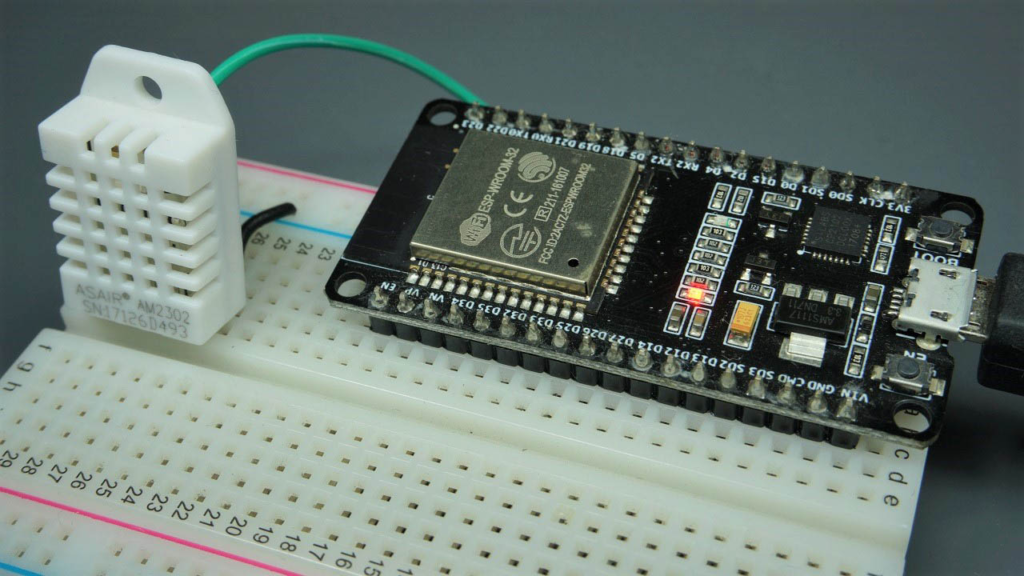
DHT11 vs. DHT22: A Data-Driven Selection Guide
Choosing the right sensor is critical for project success. While both sensors provide digital signals and are easy to use, their specifications cater to different needs and budgets.
The table below provides a clear, actionable comparison based on manufacturer datasheets and extensive real-world testing:
| Спецификация | DHT11 | DHT22 (AM2302) | Our Practical Recommendation |
|---|---|---|---|
| Temperature Range | 0°C to 50°C | -40°C to 80°C | DHT22 for outdoor, automotive, or industrial applications. DHT11 is sufficient for controlled indoor spaces. |
| Temperature Accuracy | ±2°C | ±0.5°C | For climate control or scientific monitoring, the DHT22‘s precision is mandatory. |
| Humidity Range | 20% to 80% RH | 0% to 100% RH | Он DHT22‘s full range is essential for applications like humidity chambers or tropical environments. |
| Humidity Accuracy | ±5% RH | ±2% RH (typical) | Он DHT22 provides reliably accurate humidity readings for comfort and process monitoring. |
| Sampling Rate | 1 Hz (1 reading/second) | 0.5 Hz (1 reading/2 seconds) | For rapidly changing environments, the DHT11 can be more responsive. |
| Источник питания | 3.3V to 5.5V | 3.3V to 6V | Both work perfectly with the ESP32’s 3.3V pin, simplifying wiring. |
| Cost | ~$1-$2 | ~$4-$6 | DHT11 wins for ultra-low-budget, multi-node projects where highest accuracy isn’t critical. |
The Verdict: For most serious IoT projects, especially those involving data logging or system control, the DHT22 is worth the small extra investment due to its superior accuracy and wider range. The DHT11 is ideal for educational purposes, simple indicators, or projects where cost is the absolute primary constraint.
Hardware Setup: Wiring for Reliability
A stable physical connection is paramount. The DHT sensors use a single-wire bidirectional protocol, which can be sensitive to electrical noise.
Components Required:
-
ESP32 Development Board (e.g., ESP32 DevKit V1)
-
DHT11 or DHT22 Sensor (the 3-pin module version is recommended for beginners)
-
10kΩ Pull-up Resistor (Crucial for stable communication. Some modules have this built-in; if yours doesn’t, you must add it externally.)
-
Breadboard and Jumper Wires
Wiring Diagram:
Connect the components as follows for a robust circuit:
-
DHT VCC (Pin 1) → ESP32 3.3V Pin. (While 5V is sometimes used, 3.3V avoids logic level issues and is sufficient for reliable operation.)
-
DHT DATA (Pin 2) → ESP32 GPIO 4 (or any other digital pin).
-
DHT DATA (Pin 2) → 10kΩ Resistor → ESP32 3.3V Pin. (This is the pull-up resistor.)
-
DHT GND (Pin 4) → ESP32 GND.
Полезный совет: Keep jumper wires as short as possible to reduce noise. For permanent installations, consider soldering the pull-up resistor directly between the data and VCC lines on the sensor module.
Software Configuration: Installing Libraries and Writing Smart Code
1. Installing the Required Libraries
Open the Arduino IDE and navigate to Sketch > Include Library > Manage Libraries…. Найдите и установите:
-
“DHT sensor library for ESPx” by beegee_tokyo (This is a well-maintained fork that works excellently with ESP32).
-
“Adafruit Unified Sensor” by Adafruit (This provides a common data model used by the DHT library).
2. Production-Ready Arduino Sketch
The following code is enhanced with error handling, non-blocking timing (avoiding delay()), and efficient serial output—practices essential for stable IoT devices.
/**
 * ESP32 DHT11/DHT22 Sensor Reader
 * Enhanced with error handling, non-blocking delays, and heat index calculation.
 * Board: ESP32 Dev Module
 */

#включать <DHTesp.h> // Use the DHTesp library for ESP32

// =========== CONFIGURATION ===========
#определять DHTPIN 4          // GPIO pin connected to DHT data
#определять DHTTYPE DHT22     // Sensor type: DHT22 (change to DHT11 if needed)
константа инт READ_INTERVAL = 3000; // Read every 3 seconds (respects sensor cooldown)
// =====================================

DHTesp dht;
без подписи длинный previousMillis = 0;
bool sensorInitialized = ЛОЖЬ;

пустота настраивать() {
  Серийный номер.начинать(115200);
  задерживать(100); // Short delay for Serial stabilization

  Серийный номер.println("\n=== ESP32 DHT Environmental Monitor ===");

  // Initialize the DHT sensor
  dht.настраивать(DHTPIN, DHTesp::DHTTYPE);

  // Check sensor status after a brief pause
  задерживать(500);
  TempAndHumidity lastReading = dht.getTempAndHumidity();
  если (isnan(lastReading.temperature) || isnan(lastReading.влажность)) {
    Серийный номер.println("WARNING: Initial sensor read failed. Check wiring and power.");
  } еще {
    sensorInitialized = истинный;
    Серийный номер.println("DHT sensor initialized successfully!");
    Серийный номер.печать("Using sensor: ");
    Серийный номер.println(dht.getModel());
  }
  Серийный номер.println("-----------------------------------");
}

пустота петля() {
  без подписи длинный currentMillis = миллис();

  // Non-blocking timer for sensor reads
  если (currentMillis - previousMillis >= READ_INTERVAL) {
    previousMillis = currentMillis;

    readSensorData();
  }
  // Your other non-blocking code can run here (e.g., Wi-Fi handling)
}

пустота readSensorData() {
  // Use the getTempAndHumidity() method for efficient, simultaneous reading
  TempAndHumidity data = dht.getTempAndHumidity();

  // Robust error checking
  если (dht.getStatus() != 0) {
    Серийный номер.печать("Sensor read error: ");
    Серийный номер.println(dht.getStatusString());
    возвращаться;
  }

  // Print formatted data to Serial Monitor
  Серийный номер.печать("Humidity: ");
  Серийный номер.печать(данные.влажность, 1); // Print with 1 decimal place
  Серийный номер.печать(" %\t");

  Серийный номер.печать("Temperature: ");
  Серийный номер.печать(данные.temperature, 1);
  Серийный номер.печать(" °C | ");

  плавать fahrenheit = (данные.temperature * 1.8) + 32;
  Серийный номер.печать(fahrenheit, 1);
  Серийный номер.печать(" °F\t");

  // Calculate and display Heat Index (feels-like temperature)
  плавать heatIndexC = dht.computeHeatIndex(данные.temperature, данные.влажность, ЛОЖЬ);
  Серийный номер.печать("Heat Index: ");
  Серийный номер.печать(heatIndexC, 1);
  Серийный номер.println("" °C"");
}
Code Explanation and Best Practices:
-
Non-Blocking Delays: Using
millis()instead ofdelay()allows the ESP32 to perform other tasks (like network communication) between sensor reads. -
Comprehensive Error Handling: Он
dht.getStatus()function provides specific error codes, making debugging far easier than generic “read failed” messages. -
Efficient Data Retrieval:
getTempAndHumidity()reads both values in a single, faster operation. -
Clear Output: Data is printed with consistent formatting and units for easy reading and logging.
Systematic Troubleshooting: Beyond “Failed to Read”
If you encounter “Failed to read from DHT sensor!” or NaN values, follow this diagnostic flow:
-
The 30-Second Hardware Check:
-
Verify Wiring: Use a multimeter in continuity mode to check for loose breadboard connections—the #1 cause of failure.
-
Confirm Pull-up Resistor: If your module lacks a built-in resistor, a 10kΩ resistor between DATA and 3.3V is non-negotiable.
-
Test Power: Measure voltage between VCC and GND pins at the sensor. Ensure it’s a stable 3.3V.
-
-
Software and Configuration:
-
Library Conflict: Uninstall any other “DHT” libraries and keep only “DHT sensor library for ESPx” и “Adafruit Unified Sensor”.
-
Correct Pin Definition: Ensure
DHTPINin your code matches your physical wiring. -
Adequate Power Supply: Он ESP32 can brown-out during Wi-Fi transmission. Power your board with a reliable 5V/2A USB adapter, not just a laptop USB port.
-
-
Sensor-Specific Issues:
-
Respect the Cooldown: Enforcing a 2-second (DHT22) or 1-second (DHT11) minimum between read attempts is critical.
-
Environmental Factors: Condensation can damage sensors. Ensure the DHT22 is not exposed to direct water contact.
-
Sensor Failure: These are low-cost components. If all else fails, try a different sensor module. Batch failures are not uncommon.
-
From Prototype to Project: Advanced Applications
Once your basic sensor is working reliably, integrate it into a larger system:
-
ESP32 Web Server Dashboard: Use the ESP32’s Wi-Fi to host a local web page displaying real-time graphs of temperature and humidity. Libraries like ESPAsyncWebServer make this straightforward.
-
IoT Cloud Logging: Send your data to platforms like Thingspeak, Blynk, or MQTT brokers (e.g., Mosquitto) for remote monitoring and alerting.
-
Home Automation Trigger: Использовать Домашний помощник или Node-RED with the ESP32 to create automations—e.g., turning on a fan if humidity exceeds 70% or sending a mobile alert if freezing temperatures are detected.
Заключение и дальнейшие шаги
You have now successfully set up a reliable environmental monitoring node with the ESP32 and DHT sensor. The key takeaways are: choose the DHT22 for accuracy, never skip the pull-up resistor, implement proper error handling in your code, and use a systematic approach to troubleshooting.
To truly harness this data, the next logical step is connectivity. I recommend exploring our follow-up guide, “ESP32 DHT11/DHT22 Web Server – Temperature and Humidity using Arduino IDE,” which will teach you how to create a professional, mobile-friendly dashboard accessible from any device on your network. This transforms your prototype into a fully functional IoT device.
For further learning, the official ESP-IDF framework documentation и Adafruit learning system provide deep dives into more advanced sensor fusion and power-saving techniques.
======================================