
How to Get a PCB or Assembly Quote on PCB32
Start with what you want delivered. Choose Standard PCB/PCBA for bare boards, or PCB Assembly if you need components mounted. The two routes use the same board fabrication files, but assembly also needs a parts list and placement information.

1. Upload the board files and check the specifications
On either quote page, use Add Gerber File to upload one archive containing the Gerber layers and drill files for the revision you want to build. The preview helps you spot a missing outline or incorrect dimensions. Check the dimensions and layer count against your design, then enter the quantity and confirm the material, thickness, copper weight, and finish. Add any special fabrication notes before proceeding.
For bare boards, review the estimate in Pricing & Build Time and follow the order page to checkout. The final price is subject to file review. See the Gerber file checklist if you are unsure what belongs in the archive.
2. For assembly, add the BOM and placement files
Choose who supplies the components, which sides need assembly, and how many boards to assemble. In Required Files for Assembly, upload the BOM under Parts List (BOM) Upload and add the centroid or pick-and-place file in the placement field. Use the same revision for the Gerbers, BOM, and placement file. Include assembly drawings or instructions for parts that need special handling.
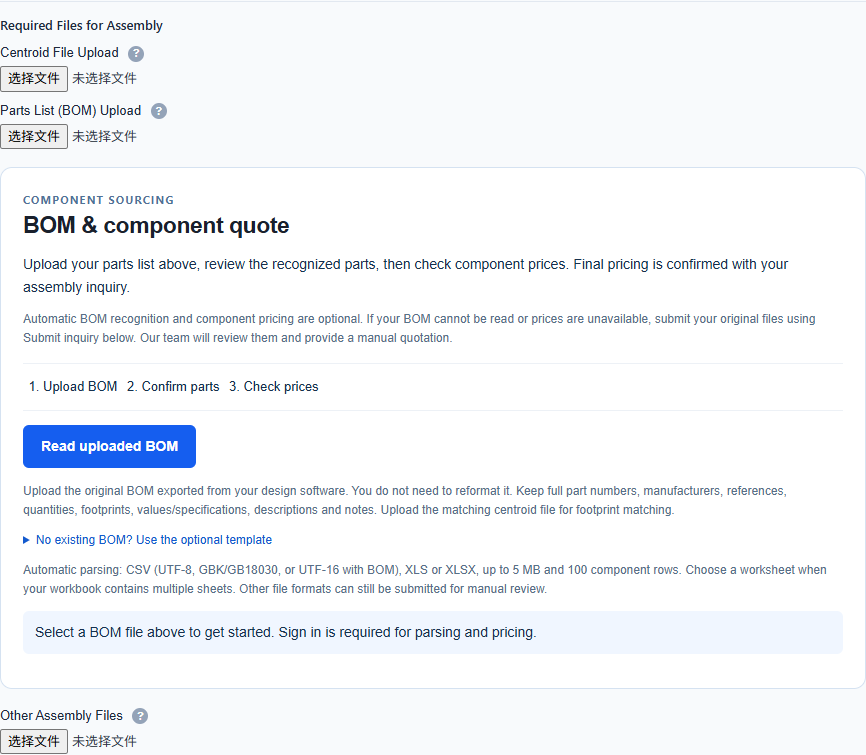
For an optional component estimate, sign in and select Read uploaded BOM. Review the recognized parts before checking prices. If automatic parsing fails, submit the original files for manual review. Component estimates are preliminary. The assembly quote confirms the final scope and price.
3. Submit the assembly inquiry and review the quote
Use Submit inquiry for assembly and keep the inquiry reference. Sign in with the account you used to submit it and open My Inquiries to review the quote when it is ready. Confirm the quantity, component sourcing, and any special assembly or testing requirements before following the payment instructions.
For a visual walkthrough, see the ordering video on the PCB32 homepage. If you need help with a specific request, contact PCB32 with the inquiry reference or order number.